Website Proper Anatomy Explained Simply
Tuesday 16th June, 2026
As a tech entrepreneur and IT project management coach, I want my clients and students to have a clear understanding of what a proper web structure is.
I created this post to highlight the key elements of a well-structured website.
Have you ever wondered what all the different sections of a website are called?
Whether you’re a blogger, web designer, business owner, or digital marketer, understanding website anatomy helps you create better user experiences, improve SEO, and increase conversions.
In this guide, we’ll break down every major part of a modern website and explain why each element matters.
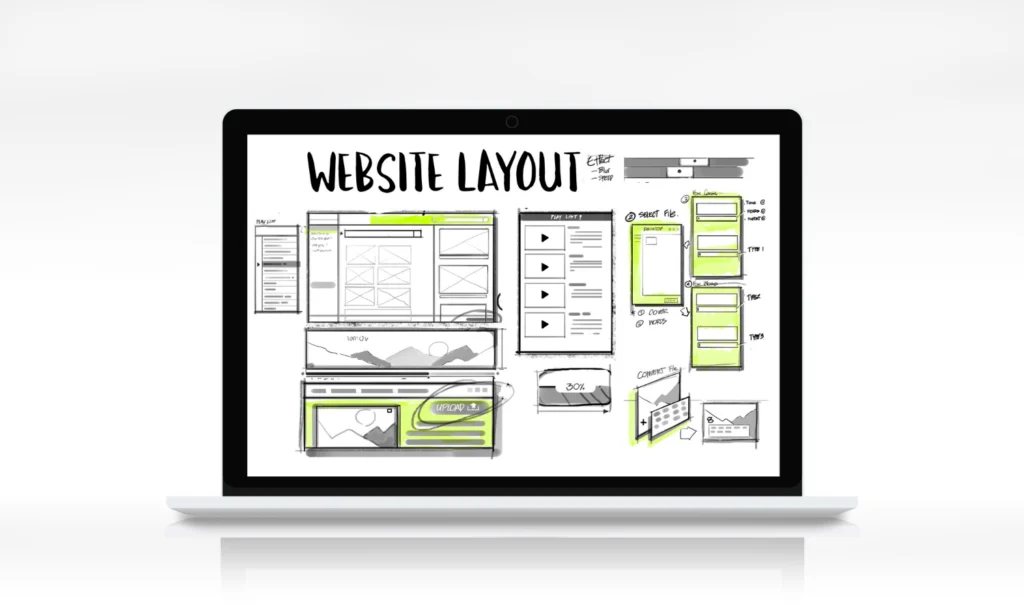
If you’ve ever looked at a website and wondered what each section is called, you’re not alone.
Modern websites contain multiple components that work together to improve user experience, support search engine optimization (SEO), and increase conversions. Understanding website anatomy helps bloggers, business owners, web designers, developers, and marketers create websites that are easier to navigate and more effective at achieving their goals.
In this guide, we’ll explain the major parts of a website, what they do, and why they matter.
What Is Website Anatomy?
Website anatomy refers to the structure and organization of a webpage. Just like the human body has different parts that serve specific functions, websites are built using sections that guide visitors through content and encourage interaction.
A well-structured website improves:
- User Experience (UX)
- Search Engine Optimization (SEO)
- Accessibility
- Website Navigation
- Conversion Rates
- Content Organization
Understanding website anatomy is essential whether you’re building a blog, business website, eCommerce store, portfolio, or landing page.
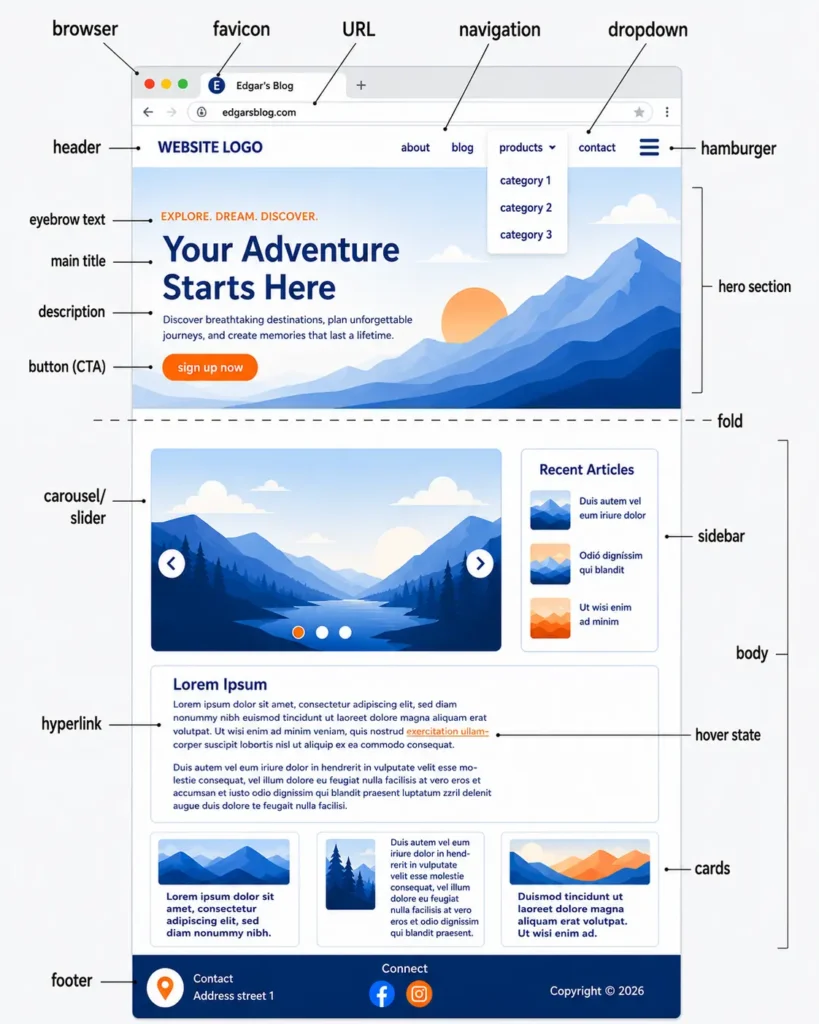
Browser, Favicon, and URL
At the very top of a webpage is the browser interface.
What Is a Browser?
A browser is the software people use to access websites, such as Google Chrome, Safari, Firefox, or Microsoft Edge.
What Is a Favicon?
A favicon is the small icon displayed next to a website’s title in the browser tab.
Purpose of a Favicon
- Improves brand recognition
- Makes tabs easier to identify
- Creates a professional appearance
What Is a URL?
A URL (Uniform Resource Locator) is the address of a webpage.
Example:
edgarsblog.com/website-anatomy-guide
SEO Benefits of Clean URLs
- Easier for users to understand
- Better search engine readability
- Improved click-through rates
- Enhanced website organization
Header
The header is the top section of a website and usually remains visible throughout the user journey.
Most headers contain:
- Website logo
- Navigation menu
- Search functionality
- Contact information
- Call-to-action buttons
Why Headers Matter
A good header helps visitors quickly find what they need and improves overall website usability.
Navigation Menu
The navigation menu provides links to important sections of a website.
Common menu items include:
- Home
- About
- Blog
- Services
- Contact
Navigation Best Practices
- Keep menu labels simple
- Limit the number of items
- Organize content logically
- Make navigation mobile-friendly
Dropdown Menu
A dropdown menu expands additional navigation options when users hover or click on a menu item.
Benefits of Dropdown Menus
- Saves space
- Organizes large websites
- Improves navigation structure
Hamburger Menu
The hamburger menu is represented by three horizontal lines and is commonly used on mobile devices.
Purpose of a Hamburger Menu
- Simplifies mobile navigation
- Reduces visual clutter
- Provides access to all pages
Understanding the Hero Section
The hero section is the large visual area near the top of a webpage, usually located directly below the header.
This section is often the first thing visitors see when they land on a page.
The primary goal of a hero section is to communicate value quickly and encourage action.
A typical hero section contains:
- Eyebrow Text
- Hero Title (H1)
- Description Text
- Call-to-Action Button (CTA)
- Supporting Image or Illustration
Eyebrow Text
Eyebrow text is a short phrase placed above the main headline.
Purpose of Eyebrow Text
- Provides context
- Introduces the topic
- Highlights a category or theme
- Improves content hierarchy
Examples of Eyebrow Text
- WEB DESIGN GUIDE
- SEO FOR BEGINNERS
- DIGITAL MARKETING TIPS
- WEBSITE DESIGN BASICS
Best Practices
Keep eyebrow text concise and relevant to the main topic.
Hero Title (H1 Heading)
The hero title is the primary headline of a webpage and is often the most important piece of text on the page.
Purpose of a Hero Title
- Capture attention
- Explain the page topic
- Communicate value
- Support SEO
Example
Website Anatomy Explained: A Complete Guide to Website Structure
Best Practices
- Use only one H1 heading per page
- Include the target keyword naturally
- Focus on user intent
- Keep it clear and descriptive
Description Text
The description appears below the hero title and provides supporting information.
Purpose of Description Text
- Expand on the headline
- Explain benefits
- Encourage further reading
- Improve user engagement
Example
Learn the essential parts of a website, including headers, navigation menus, hero sections, call-to-action buttons, sidebars, and footers.
Best Practices
Keep descriptions concise while clearly communicating value.
Call-to-Action (CTA)
A Call-to-Action (CTA) is a button or link designed to encourage users to take the next step.
Common CTA Examples
- Get Started
- Learn More
- Read the Guide
- Subscribe Now
- Contact Us
Why CTAs Matter
CTAs help guide users toward specific goals, such as:
- Generating leads
- Increasing sales
- Growing email lists
- Driving engagement
CTA Best Practices
- Use action-oriented language
- Make buttons visually distinct
- Place CTAs prominently
- Focus on one primary action
The Fold
The fold refers to the portion of a webpage visible before a user begins scrolling.
Why the Fold Matters
Content above the fold often receives the most attention.
Important elements typically placed above the fold include:
- Hero Title
- Value Proposition
- CTA Button
- Key Messaging
Carousel or Slider
A carousel or slider displays multiple pieces of content within a rotating container.
Common Uses
- Featured articles
- Product showcases
- Promotions
- Portfolio items
Advantages
- Saves space
- Highlights important content
- Improves visual engagement
Potential Drawbacks
Excessive use of sliders can negatively impact user experience and page speed.
Sidebar
A sidebar contains supplementary content displayed beside the main content area.
Common Sidebar Elements
- Recent Posts
- Categories
- Popular Articles
- Newsletter Forms
- Advertisements
Benefits
Sidebars improve content discovery and encourage visitors to explore additional pages.
Hyperlinks
Hyperlinks connect one page to another.
Types of Hyperlinks
Internal Links
Links that connect pages within the same website.
External Links
Links that point to other websites.
SEO Benefits of Internal Linking
- Helps search engines crawl content
- Improves user navigation
- Distributes authority across pages
- Increases page views
Content Cards
Content cards organize information into visually separated sections.
Examples of Content Cards
- Blog post previews
- Product listings
- Team profiles
- Service descriptions
Why Content Cards Work
Content cards make information easier to scan and improve user engagement.
Footer
The footer is the section located at the bottom of a webpage.
Common Footer Elements
- Contact Information
- Social Media Links
- Copyright Notice
- Privacy Policy
- Terms and Conditions
- Sitemap Links
Why Footers Matter
A well-designed footer provides users with important information and additional navigation options.
Website Anatomy Best Practices
To create an effective website structure, follow these principles.
Prioritize User Experience
Design every section with usability in mind.
Create Clear Navigation
Help visitors find information quickly.
Use Strong Headings
Organize content using a logical heading structure.
Optimize for Mobile Devices
Ensure all website components function properly on smartphones and tablets.
Improve Page Speed
Fast-loading pages improve both user experience and SEO.
Include Clear CTAs
Guide visitors toward meaningful actions.
Frequently Asked Questions
What are the main parts of a website?
The main parts of a website include the header, navigation menu, hero section, content area, sidebar, footer, hyperlinks, and call-to-action buttons.
What is a hero section?
A hero section is the large visual area near the top of a webpage designed to communicate value and encourage action.
What is eyebrow text?
Eyebrow text is a short phrase placed above the main headline to provide context and improve content hierarchy.
Why is website structure important?
Website structure improves user experience, SEO, accessibility, and conversion rates.
Conclusion
Understanding website anatomy is essential for building effective websites.
From the favicon and URL to the hero section and footer, every component serves a specific purpose. When these elements work together, they create a better experience for visitors while helping search engines understand and rank your content.
Whether you’re designing your first website or optimizing an existing one, mastering website anatomy will help you create websites that are easier to navigate, more engaging, and better optimized for search engines.
Posted by Edgar Hovhannisyan